Assistance
OverRender OverText 2022 Assistance
OverRender OverText 2022 Assistance
OverSuite Online > Assistance > OverText 2022 Assistance > Getting the latest enhancements and security fixes
Updates are crucial to your software. They help keeping it as secure and complete as possible. We strongly recommend you to install every available security or critical update for your software.
Service Pack 4a for OverText 2022 included an option to change between the CopperCart Update website and the CopperCart Update Agent. To choose between both ways, follow one of the above procedures:
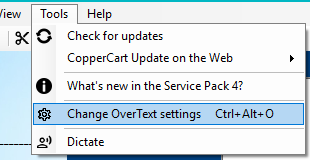
(Menus) Tools > Change OverText settings
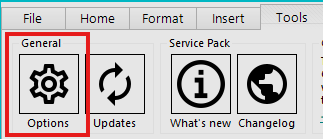
(Ribbon) Tools > Options
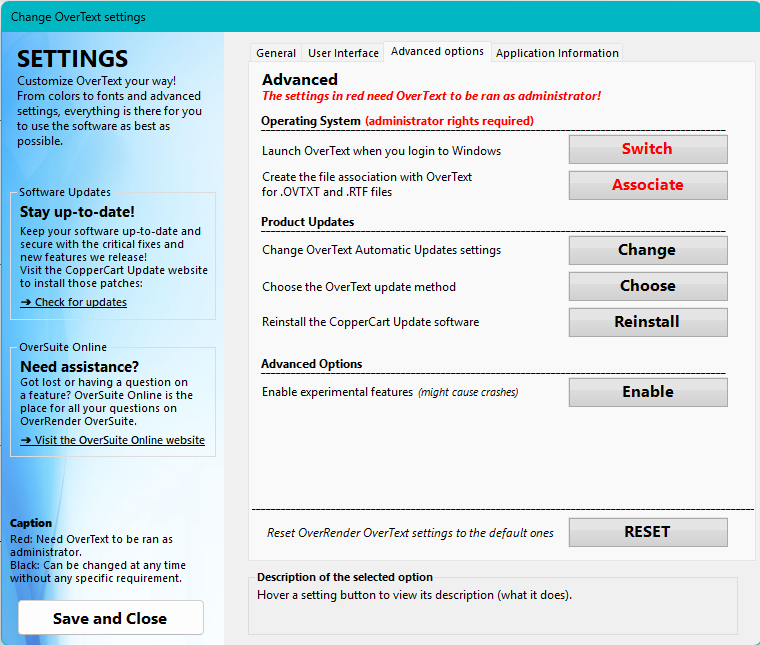
The "Change OverText settings" window shows up. Click on the Advanced tab, and click the "Choose" button next to "Choose the OverText update method".
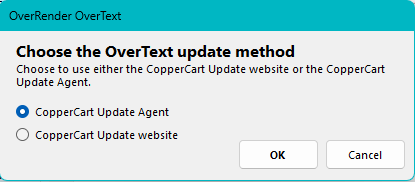
Choose one of the two options, and click OK. Your changes will take effect immediately.
You can now check for updates by following one of the above procedures:
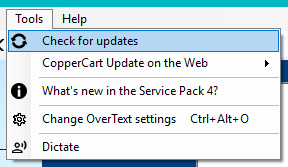
(Menus) Tools > Check for Updates
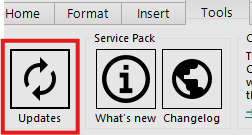
(Ribbon) Tools > Updates
Versions older than Service Pack 4a will automatically decide to either use the Update Agent or Update Website. To start checking for updates, follow one of the following procedures:
(Menus) Tools > Check for Updates
(Ribbon) Tools > Updates
You can now check for updates!